Versions: 10.2.1a - current
Product Availability: ArcFM Desktop
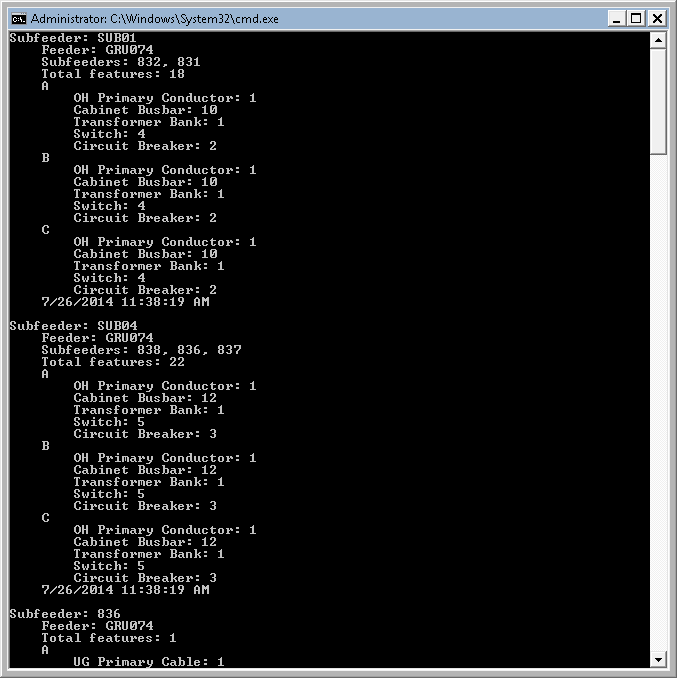
Added along with Feeder Manager 2.0, you can now obtain derived Feeder Information quickly and easily with the FeederInfoProvider. Use this sample to report summary information every feeder and subfeeder in the network. Works for Feeder Manager 1 and Feeder Manager 2 customers.
How to Implement:
- You may modify the code sample. This step is not required.
- Build the solution.
How to Use:
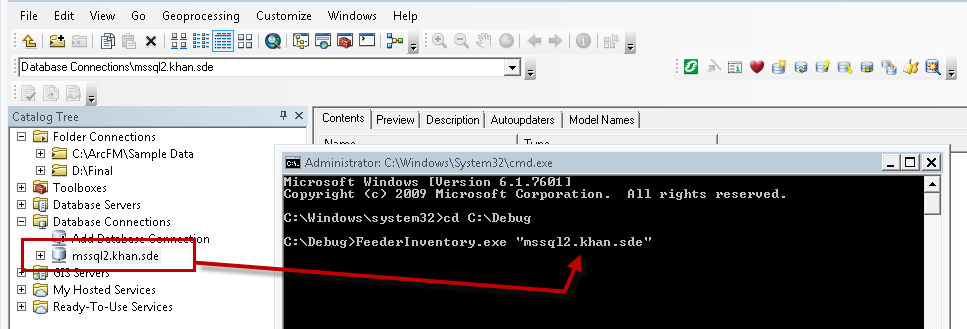
- Start a command prompt and navigate to the bin\Debug folder for this project.
- Run the executable, passing in the name of an sde connection created by ArcCatalog.
FeederInventory.exe "Connection to khan
.sde"
Requires:
All of the files shown below are required for the project to compile successfully.
| Files | Description |
|---|
| FeederInventory.sln | Solution containing code for the FeederInventory tool. |
| FeederInventory.csproj | C# project containing code for the FeederInventory tool. |
| Program.cs | The main program. Uses FeederInfoProvider to count features per phase for each feeder. |
| Licenses.cs | Supporting class module to initialize the product. |
| App.config | Configuration file for log4net. |
| AssemblyInfo.cs | Assembly properties, including some log4net configuration settings. |
See also:
Sample - Synchronize Feeder Information
FeederInventory.zip