Versions: 10.2.1a - Current
Product Availability: ArcFM Desktop
When editing feeders in ArcMap, you can update Feeder Manager 1.0 fields without running ArcFM post tools. Use this sample to add the Synchronize FeederInfo button to your toolbar. This add-in allows you to use Feeder Manager 2.0 to compute and assign values to Feeder Manager 1.0 fields, in a version currently being edited.
Bonus: This sample also contains a FeederDiffCommand that shows how you can list the features whose Feeder Manager 2.0 values in a given version differ from the corresponding Feeder Manager 1.0 fields in that same version. The API used by this example gives you a way to preview the differences, in great detail if you wish, without updating any features.
Pre-requisites:
- An SDE database; this sample will not work with a file or personal geodatabase
- Install Esri's ArcObjects SDK for Microsoft .NET Framework
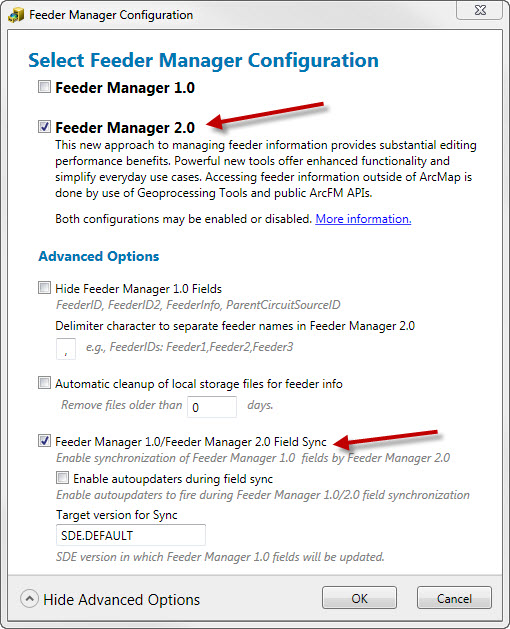
- Configure Feeder Manager 2.0
- Enable Feeder Manager 2.0 Field Sync
How to Implement:
- You may modify the code sample. This step is not required.
- Compile the code sample.
- If you wish to share this add-in on another machine, copy FeederSyncSample.esriAddIn to the machine. Double-click it to install it locally.
How to Use:
- Open ArcMap.
- Under the Customize menu, select Add-In Manager. The FeederSync Sample appears on the Add-Ins tab.
- Click Customize, then select the Commands tab.
- From the Add-In Controls category, add the Synchronize Feeder Info button to a toolbar.
- Click Close on the Customize window.
- When editing feeders in ArcMap, you can click the Synchronize Feeder Info button to update Feeder Manager 1.0 fields (FeederID, FeederID2) with Feeder Manager 2.0 information.
Requires:
All of the files shown below are required for the project to compile successfully.
| File | Description |
|---|
| FeederSyncSample.sln | Solution containing the code to add Synchronize Feeder Info button. |
| FeederSyncSample.csproj | C# project containing the code to add Synchronize Feeder Info button. |
| Conf.Designer.cs | Supporting class module. |
| FeederDiffCommand.cs | Supporting class module. |
| SyncFeederInfoCommand.cs | Supporting class module. |
| Properties\AssemblyInfo.cs | Supporting class module. |
| Attribution.txt | Attribute image use to owners. |
| Images | Contains images for icon use. |
See also:
Sample - Feeder Inventory
FeederInventory.zip
FeederInventory.zip - 10.6.1